
How to Install DBAwareLabeledComponents into Delphi
There are three ways to install DBAwareLabeledComponents into Delphi: using the "Setup", with DPM (Delphi Package Manager) or manually.
1.Automatic Installation using Setup
Download the Setup file DBAwareLabeledComponents_Setup.exe
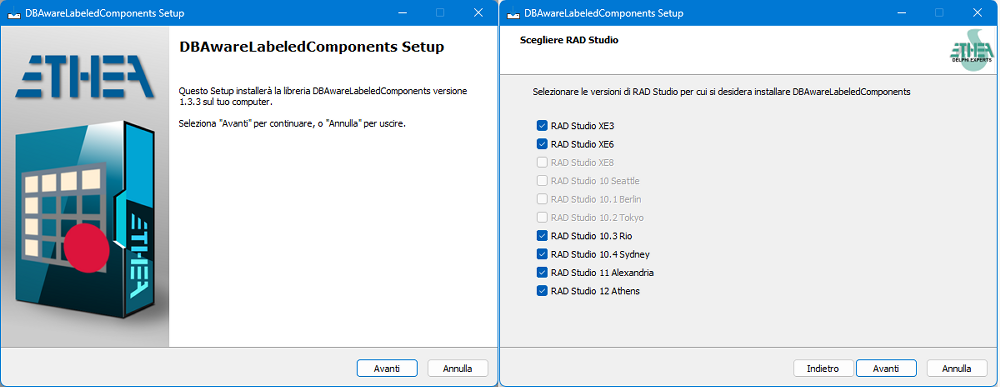
Running this Setup you can easily:
- Select the version of Delphi present in your system
- Select a specific developing folder The Setup automatically:
- Builds units (32 and 64 bits in release mode)
- Builds Runtime Packages (for Win32 and Win64 Platforms)
- Builds and Install Designtime Packages (for Win32 bits only)
- Builds and Install Designtime Packages (for new Win64 Delphi IDE)
- Adds a LABELEDCOMPDIR environment variable
- Adds the 32 and 64 bit paths form:
- the binaries units
- all the sources
Please note that if you have already installed a GetIt package version of the same library, it will be uninstalled first.
2.Installation with DPM (Delphi Package Manager)
The library is also published on delphi.dev as the package EtheaDev.DBAwareLabeledComponents (Delphi XE3 to 13, Win32 and Win64): you can install it with DPM, the Delphi Package Manager, as an alternative to the Setup. From the IDE, right click on your project in the Project Manager and choose Manage DPM Packages, or from the command line:
dpm install EtheaDev.DBAwareLabeledComponents <path of your project>.dprojDPM downloads the package, builds it for the Delphi version and the platforms of your project and adds it to the project.
3.Manual Installation
You can manually install the components, using those steps:
- Clone the repository into your developing folder
- Open your Delphi IDE
- Load the file PackageGroup.groupproj located into: {DBAwareLabeledComponentsFolder}\Packages{DelphiVersion}
- Click to "Show Build Groups Pane" in the toolbar of Project Panel
- Click to "Build the current build group" (the Active group "ALL")
- Create an environment variabile named LABELEDCOMPDIR pointing to
- Manually add the Source location of the binary files to your system (for example):
- for 32 bit: $(LABELEDCOMPDIR)\Lib\D12\Win32\Release
- for 64 bit: $(LABELEDCOMPDIR)\Lib\D12\Win64\Release
- If you want to compile source files, add:
- $(LABELEDCOMPDIR)\Source
License
Licensed under the Apache License, Version 2.0, (the "License")